
Low, high and critical alerts for your CGM readings
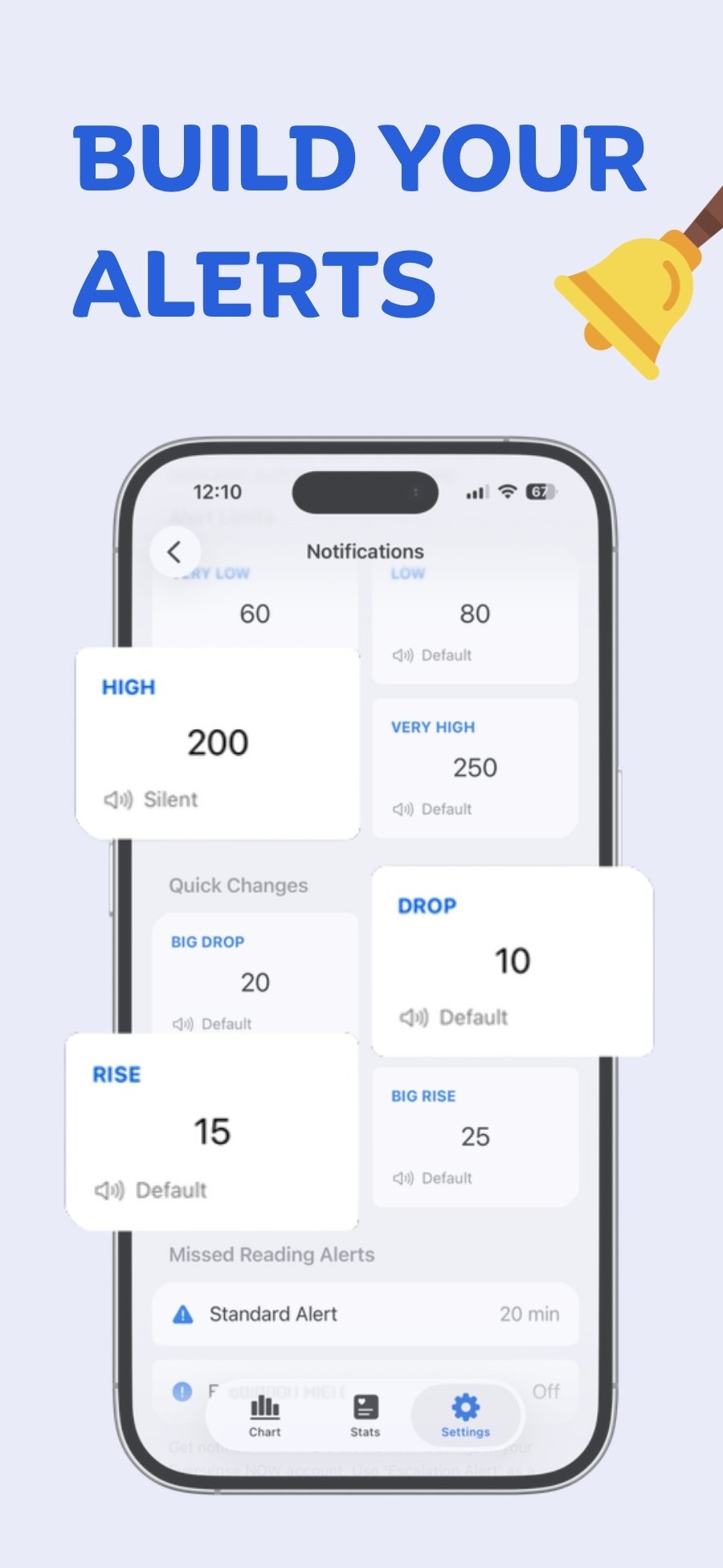
Free alerts for very low, low, high, very high, fast rises and drops, and missed readings. Each can be Regular, Time Sensitive, or Critical, which sounds even when muted and overrides Focus modes.
Free
How to set it up
- Go to Settings → Notifications in Sweet Dreams.
- Tap an alert (for example Low) and set its threshold.
- Tap Priority and choose Regular, Time Sensitive (stays on the Lock Screen for an hour) or Critical. Critical alerts play a sound even when your iPhone is muted and override Focus modes such as Sleep. Allow Critical Alerts when iOS asks.
- Set up missed-reading alerts too: a standard alert, plus an escalation if readings still haven't arrived.
Details
- Threshold alerts: Very Low, Low, High and Very High.
- Change alerts: Big Drop, Drop, Rise and Big Rise.
- Missed-reading alerts: a standard alert and an escalation alert when no new reading arrives.
- Sweet Dreams alerts are an extra layer. Keep the alarms in your CGM's own app turned on.
- Notification profiles (such as Sleep, Gym or School) let you switch all your alert settings at once, and can switch automatically with Shortcuts.
Alerts with your device
 Free on the App Store for iPhone, Apple Watch, iPad and Apple silicon Macs.
Last updated 2026-10-12